A Column Schedule Tracker is one of the most essential registers maintained by a Site Engineer on any reinforced concrete building construction project. Columns are the primary vertical load-carrying structural members of a building, transferring all loads from beams, slabs, and floors down to the foundations. Proper tracking of each column — from reinforcement detailing to concrete pouring and curing — is critical for structural integrity, quality control, and project documentation.
This guide explains everything a Site Engineer needs to know about maintaining a Column Schedule Tracker effectively throughout all stages of building construction.
1. What is a Column Schedule Tracker?
A Column Schedule Tracker is a structured register that records all technical and site-specific information for every column in a building. It acts as a single source of truth for all column-related activities on site and is referenced by the site engineer, quality engineer, structural consultant, and client.
Information Recorded in the Tracker
- ✅ Unique identification (Column Mark)
- ✅ Structural dimensions (size and height)
- ✅ Reinforcement steel details (bar diameter, number, stirrups)
- ✅ Concrete specifications (grade, mix design)
- ✅ Pour dates and curing milestones
- ✅ Quality control records (cube references, inspections)
- ✅ Current construction status
2. Importance of Column Schedule Tracker for a Site Engineer
2.1 Quality Control
Every column pour must be preceded by a formal inspection. The Column Schedule Tracker ensures no column is poured without verifying:
- Correct reinforcement as per structural drawings
- Adequate clear cover to all reinforcement
- Proper stirrup spacing — especially at lap zones and column ends
- Shuttering alignment, plumb, and adequate supports
- Cleanliness of the column formwork base
2.2 Progress Monitoring
The tracker provides an instant view of how many columns are completed, in progress, scheduled, or pending across all floors. This helps the site engineer plan resources, schedule equipment, and report accurate progress to the project manager.
2.3 Documentation & Compliance
All quality audits, third-party inspections, and client reviews require documentary evidence. The Column Schedule Tracker provides:
- Date-wise pour history for all columns
- Concrete grade and cube sample traceability
- Reinforcement compliance record
2.4 Material Planning
By having all column dimensions and steel details in one place, the site engineer can pre-calculate the quantity of steel and concrete required for each pour, enabling accurate material requisition and reducing wastage.
3. Components of a Column — Technical Overview
3.1 Cross-Section Dimensions
| Parameter | Description | Typical Range |
|---|---|---|
| Size B (mm) | Breadth (shorter dimension) of column cross-section | 200 mm to 750 mm |
| Size D (mm) | Depth (longer dimension) of column cross-section | 200 mm to 750 mm |
| Column Height (mm) | Vertical height from top of footing/slab to underside of next beam | 2800 mm to 4500 mm |
3.2 Main Reinforcement Steel
Main bars (longitudinal reinforcement) carry the primary axial and bending loads in the column. They run the full height of the column with defined lap lengths at construction joints.
| Parameter | Description | IS 456 / Good Practice |
|---|---|---|
| No. of Main Bars | Total count of longitudinal bars | Minimum 4 for rectangular columns |
| Main Bar Dia | Diameter of TMT bar (Fe415/Fe500) | 12 mm to 32 mm typical |
| Clear Cover | Clear distance from outer face to stirrup surface | 40 mm (moderate exposure) |
3.3 Stirrups / Lateral Ties
Stirrups provide lateral confinement to the main bars, resist shear forces, and prevent buckling of the main reinforcement under load. Spacing is critical at beam-column joints and lap splice zones.
- Standard spacing: 150 mm to 200 mm in mid-height zone
- Close spacing (75–100 mm): at column ends (top and bottom 300–450 mm), at laps
- Minimum stirrup diameter: 6 mm or one-quarter of main bar dia, whichever is greater
4. Concrete Grades for Columns
| Grade | fck (N/mm²) | Application | w/c Ratio | Use in Building |
|---|---|---|---|---|
| M20 | 20 | Low-rise residential | 0.55 | Ground floor, G+2 |
| M25 | 25 | Medium-rise | 0.50 | G+4 to G+7 |
| M30 | 30 | High-rise / heavy load | 0.45 | G+8 and above |
| M35 | 35 | Core / transfer columns | 0.40 | Core walls, podium |
| M40+ | 40+ | High-performance concrete | < 0.40 | High-rise towers |
5. Sample Column Schedule — Ground Floor
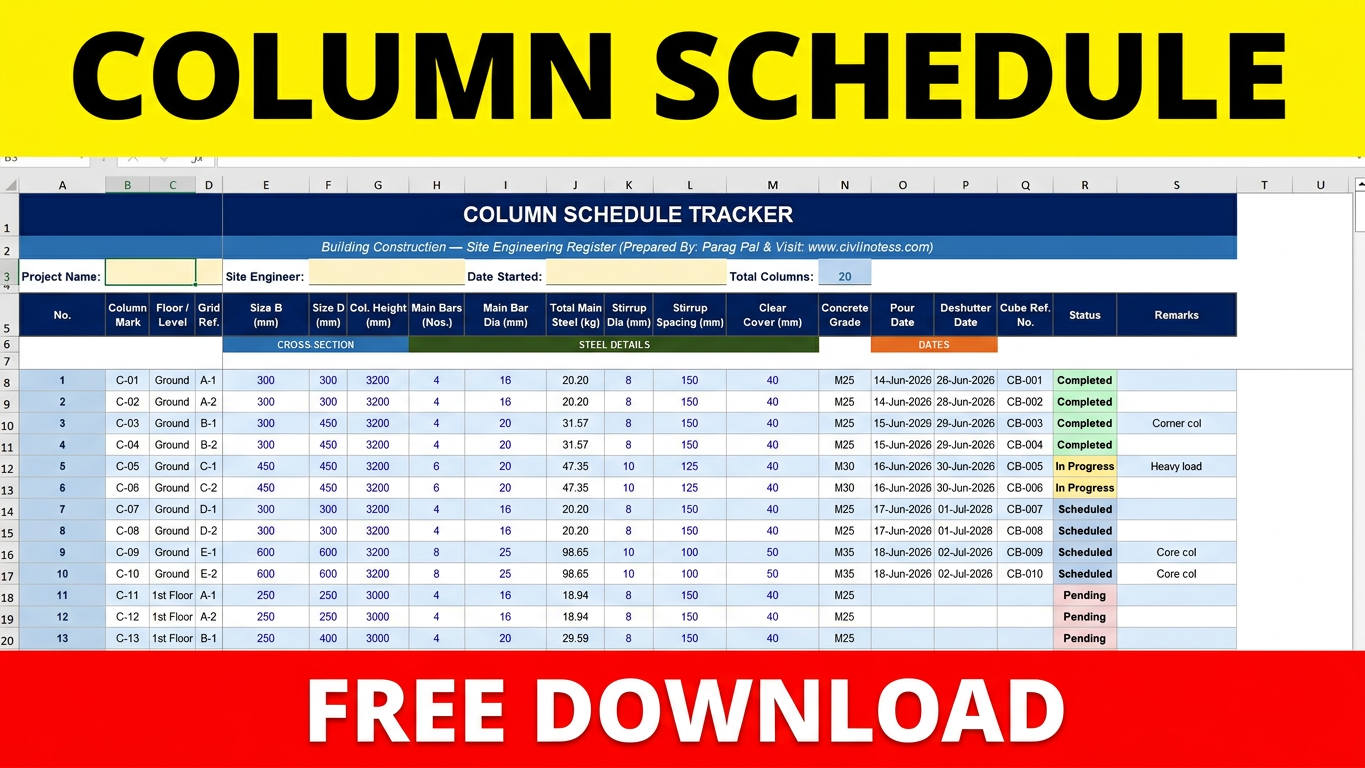
The following is an extract from the Column Schedule Tracker Excel sheet for the Ground Floor of a sample building project:
| Col. Mark | Floor | Grid | Size | Ht.(mm) | Main Steel | Stirrups | Grade | Pour Date | Status |
|---|---|---|---|---|---|---|---|---|---|
| C-01 | Ground | A-1 | 300×300 | 3200 | 4-16mm | 8mm@150 | M25 | 14-Jun-2026 | ✅ Completed |
| C-02 | Ground | A-2 | 300×300 | 3200 | 4-16mm | 8mm@150 | M25 | 14-Jun-2026 | ✅ Completed |
| C-03 | Ground | B-1 | 300×450 | 3200 | 4-20mm | 8mm@150 | M25 | 15-Jun-2026 | ✅ Completed |
| C-04 | Ground | B-2 | 300×450 | 3200 | 4-20mm | 8mm@150 | M25 | 15-Jun-2026 | ✅ Completed |
| C-05 | Ground | C-1 | 450×450 | 3200 | 6-20mm | 10mm@125 | M30 | 16-Jun-2026 | 🔄 In Progress |
| C-06 | Ground | C-2 | 450×450 | 3200 | 6-20mm | 10mm@125 | M30 | 16-Jun-2026 | 🔄 In Progress |
| C-07 | Ground | D-1 | 300×300 | 3200 | 4-16mm | 8mm@150 | M25 | 17-Jun-2026 | 📅 Scheduled |
| C-08 | Ground | D-2 | 300×300 | 3200 | 4-16mm | 8mm@150 | M25 | 17-Jun-2026 | 📅 Scheduled |
| C-09 | Ground | E-1 | 600×600 | 3200 | 8-25mm | 10mm@100 | M35 | 18-Jun-2026 | 📅 Scheduled |
| C-10 | Ground | E-2 | 600×600 | 3200 | 8-25mm | 10mm@100 | M35 | 18-Jun-2026 | 📅 Scheduled |
6. Pre-Pour Checklist for Columns
Before recording a pour date in the tracker, the site engineer must physically verify and sign off on the following checks:
A. Reinforcement Checks
- Bar diameters match structural drawing — verify with vernier caliper
- Number of bars correct as per column schedule
- Lap lengths provided as per IS 456 (generally 50d for compression)
- Stirrup diameter, shape, and hooks as specified
- Stirrup spacing — close spacing at ends, standard at mid-height
- Clear cover maintained — use PVC cover blocks of correct size
- No rust, mud, or oil on reinforcement
B. Shuttering Checks
- Formwork is plumb (vertical) — check with plumb bob or spirit level
- Column dimensions correct — measure both B and D at top and bottom
- All joints sealed with foam tape or putty to prevent grout leakage
- Adequate props and bracing in all four directions
- Release agent (mould oil) applied to inner face of shuttering
- Base of column free of debris, water, and loose concrete chips
C. Concrete Pour Checks
- Concrete mix design approved and mix ratio displayed at site
- Slump test conducted — record result in tracker
- Cube moulds prepared — pour minimum 3 cubes per 5 m³ concrete
- Vibrator (needle vibrator) ready and operational
- Concrete poured in layers not exceeding 600 mm
- Compaction done thoroughly without touching reinforcement with vibrator
- Pour date and time recorded in Column Schedule Tracker immediately
7. How to Use the Column Schedule Tracker Excel
Sheet 1: Column Schedule Tracker
- Rows 1–6: Project information and column headers — fill in project name and site engineer name
- Row 8 onwards: Enter one column per row
- Column J (Total Main Steel) is AUTO-CALCULATED — do not type in it
- Column N (Concrete Grade) and Column R (Status) have dropdown lists
- Freeze panes are set at E8 — scroll right while keeping column marks visible
Sheet 2: Summary Dashboard
- All values are auto-calculated from the Tracker sheet
- Shows total columns, status-wise count, and total steel quantity
- Update the Status column in Tracker to see live dashboard changes
Sheet 3: HOW TO USE
- Contains a field-by-field guide to every column in the tracker
- Refer to this sheet when onboarding new team members
8. Relevant IS Codes & Standards
| IS Code | Description |
|---|---|
| IS 456:2000 | Plain and Reinforced Concrete — Code of Practice |
| IS 13920:2016 | Ductile Detailing of Reinforced Concrete Structures |
| IS 1786:2008 | High Strength Deformed Steel Bars (TMT Bars) |
| IS 516:1959 | Methods of Tests for Strength of Concrete |
| IS 10262:2019 | Guidelines for Concrete Mix Design |
| SP 34:1987 | Handbook on Concrete Reinforcement and Detailing |
9. Site Engineer Tips & Best Practices
- 🕐 Always update the tracker on the same day as the pour — never leave it for the next day
- 📸 Attach pre-pour inspection checklist photo to the cube test register for traceability
- 🏢 For high-rise buildings, maintain a separate tracker per floor for clarity
- 🎨 Colour-code your Status column: Green = Completed, Yellow = In Progress, Red = On Hold
- 🔢 Cross-reference cube numbers in this tracker with the Cube Test Register
- 🖨️ Keep a printed copy in the site office along with the digital version
- 📊 Share weekly progress summary from the Dashboard sheet with the Project Manager
- 📝 For columns with varied steel at different floors (e.g., curtailment), note it in Remarks
- 📐 Review structural drawing revisions regularly and update column sizes if revised
- ✍️ Never pour a column without getting the pre-pour inspection signed by the consultant
Download Excel File Here – Column Schedule Tracker FREE Download
Column Schedule Tracker | Building Construction | Site Engineering Document
All fields must be filled by the Site Engineer on the day of pour.